Cybercriminals are deploying are sophisticated a phishing campaign that uses malicious Microsoft OAuth apps masquerading as legitimate Adobe and DocuSign apps to steal Microsoft 365 credentials and distribute malware.
How This Campaign Works
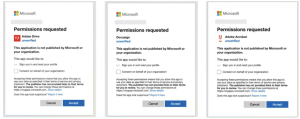 Malicious OAuth apps
This attack involves apps posing as Adobe Drive, Adobe Drive X, Adobe Acrobat, and DocuSign. These apps request limited access permissions such as profile,’ ‘email,’ and ‘openid’—seemingly harmless permissions that can slip under the radar of cautious users. However, once granted permissions allow attackers to access key user data, including full name, profile picture, and email address.
This phishing campaign is targeted multiple US and European industries, including government, healthcare, supply chain, and retail.
While these attacks leverage OAuth apps, a method for hijacking Microsoft 365 accounts without directly stealing credentials, they serve as a stark reminder of the ongoing risks associated with third-party app permissions.
The Bottom Line
Review App Permissions: Check for any unrecognized OAuth apps on your Microsoft account by visiting myapplications.microsoft.com and revoking suspicious apps.
Admin Settings: Microsoft 365 administrators can restrict OAuth app permissions entirely by adjusting consent settings in the Enterprise Applications section.
Security experts recommend remaining vigilant and ensuring that app permissions are only granted to trusted sources.
Follow us on X and Linkedin for the latest cybersecurity news.
Source:hxxps[://]www[.]bleepingcomputer[.]com/news/security/malicious-adobe-docusign-oauth-apps-target-microsoft-365-accounts