Mozilla has revoked a GPG signing subkey used for certain Firefox and Thunderbird releases after an unencrypted copy of the private key was accidentally committed to one of its private GitHub repositories. The key was used to sign Linux tarballs, RPM packages, and checksum files for the two products. Mozilla said the repository was private and access was limited to a small group of people who already had authorized access to the signing key. Mozilla still decided to replace the key as a precaution.
Mozilla said its review of available audit records found no evidence that an unauthorized person accessed the exposed key while it was stored in the repository. Everyone who could access the repository was already authorized to access the signing key through other channels. However, because the private signing key appeared in an unencrypted form, Mozilla treated the situation as a security risk and revoked it. The company has not reported evidence of unauthorized use of the key.
A software signing key is important because it allows users and systems to confirm that a downloaded file really came from the software publisher and has not been changed. If an attacker obtains a valid private signing key, they could potentially create signatures that appear legitimate and use them with malicious software. This makes release signing an important part of software supply-chain security. Mozilla therefore chose to rotate the affected signing subkey even without evidence of unauthorized access.
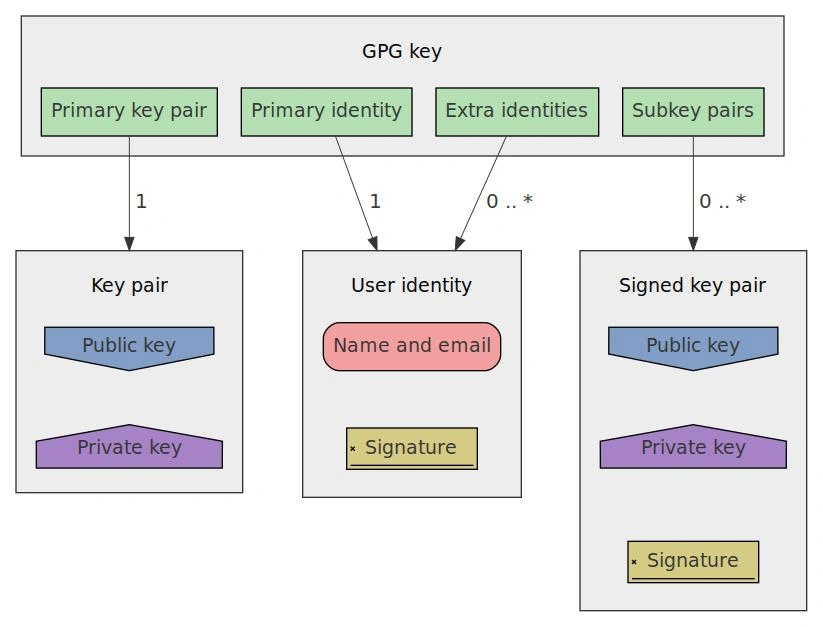
Mozilla has now moved Firefox and Thunderbird to a new GPG signing subkey for the affected Linux release artifacts. The new subkey has the fingerprint 827E 6586 0867 9618 CD34 9F93 678E 455D 7676 7AA3 and is scheduled to expire on August 5, 2028. The main Mozilla release key remains unchanged, with the fingerprint 14F2 6682 D091 6CDD 81E3 7B6D 61B7 B526 D98F 0353. Mozilla has published the new key and revocation information.
For most Firefox and Thunderbird users, the change should not require any manual action. Users who manually verify Mozilla release signatures with GPG, however, need to import the new signing key and the revocation information for the old key. Mozilla explained that after the old key is revoked, releases signed with that key will no longer be verifiable once the revocation is imported. This is expected GPG behavior.

Linux users who receive Firefox through Mozilla RPM packages may also notice problems depending on their distribution and package manager. Fedora 43 and later should download the updated key during the next update and ask the user to confirm the import. Fedora 42 and older, along with RHEL, Rocky Linux, AlmaLinux, openSUSE, and SUSE systems, may require the old key to be removed manually before the new key can be imported. Mozilla provides separate instructions for these systems.
Mozilla’s response shows why private repositories still need strong controls around sensitive cryptographic material. Keeping a repository private reduces exposure, but it does not remove the risk created when a private signing key is accidentally committed without encryption. The company reviewed access records, revoked the affected subkey, issued a replacement, and added safeguards to prevent a similar mistake. The incident also highlights the importance of keeping signing credentials outside normal source-code repositories carefully.

The incident is mainly a supply-chain security and key-management issue rather than a confirmed compromise of Firefox or Thunderbird users. Mozilla has said there is no evidence that an unauthorized party accessed the old key, while still taking the safer approach of replacing it. Users should continue obtaining Firefox and Thunderbird through trusted sources and follow Mozilla’s guidance if their Linux package manager reports a signing-key problem. The new key is now used to verify affected releases.
Stay alert, and keep your security measures updated!
Source: Follow cybersecurity88 on X and LinkedIn for the latest cybersecurity news