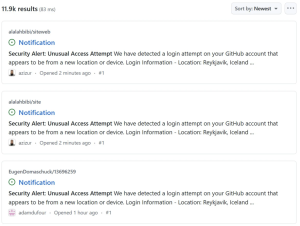
A large-scale phishing campaign has recently targeted GitHub users, affecting more than 12,000 repositories. The attackers lured developers into authorizing a malicious OAuth app by sending fake “Security Alert” issues.
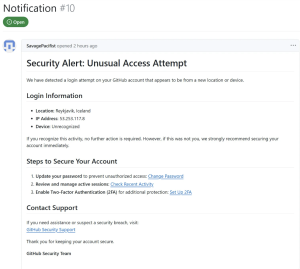
The phishing alert appeared to be a legitimate security warning: “Security Alert: Unusual Access Attempt – We have detected a login attempt on your GitHub account that appears to be from a new location or device.” The message falsely claimed that the login attempt originated from Reykjavik, Iceland, with the IP address 53.253.117.8, in an effort to make it seem more convincing.
How This Phishing Campaign Works
This alert encourages users to take immediate precautionary steps, suggesting they change their password, review active sessions, and enable two-factor authentication to secure their accounts. The links embedded in the message don’t lead to GitHub’s official pages. Instead, they direct users to a fake GitHub authorization page for a malicious OAuth app called gitsecurityapp. This app requests dangerous permissions, allowing attackers to gain access to private repositories.

Here are some of the critical permissions requested by the malicious app:
repo: Full access to all public and private repositories
user: Access to read and write user’s profile
read:org: Access to organization details, including membership, projects, and teams
discussion:Full access to discussions
gist: Full access to GitHub gists
delete_repo: To delete repositories
workflow: Complete control over GitHub Actions workflows, including updates and changes
Once a user authorizes the app, an access token is generated and sent to a callback URL hosted on onrender.com, a platform used for web applications. This allows attackers to gain full control over the affected GitHub accounts.
Impact
This campaign kicked off on March 16th morning at 6:52 AM ET, and so far, more than 12,000 repositories have been targeted in this attack. The numbers are fluctuating, which shows that GitHub is in charge and doing some heavy lifting.
The Bottom Line
If you receive any notifications similar to this security alert about an unusual access attempt, verify their authenticity and proceed with caution. If you’ve previously encountered a similar notification and granted access to a phishing site, revoke its access by going to GitHub Settings, then Applications. Revoke access to any unfamiliar or suspicious GitHub Apps or OAuth apps. In this campaign, look for apps with names similar to ‘gitsecurityapp.’
Next, check for any new or unexpected GitHub Actions (Workflows) and verify whether any private gists have been created. Additionally, if your account is linked to professional work, be sure to notify your organization’s security team as a precautionary measure.
Source:hxxps[://]www[.]bleepingcomputer[.]com/news/security/fake-security-alert-issues-on-github-use-oauth-app-to-hijack-accounts/
Follow us on X and Linkedin for the latest cybersecurity news.